
Security you can actually review
Who can see what, how sign-in is protected, what’s recorded, and exactly what is and isn’t collected, written so your IT team can check it.

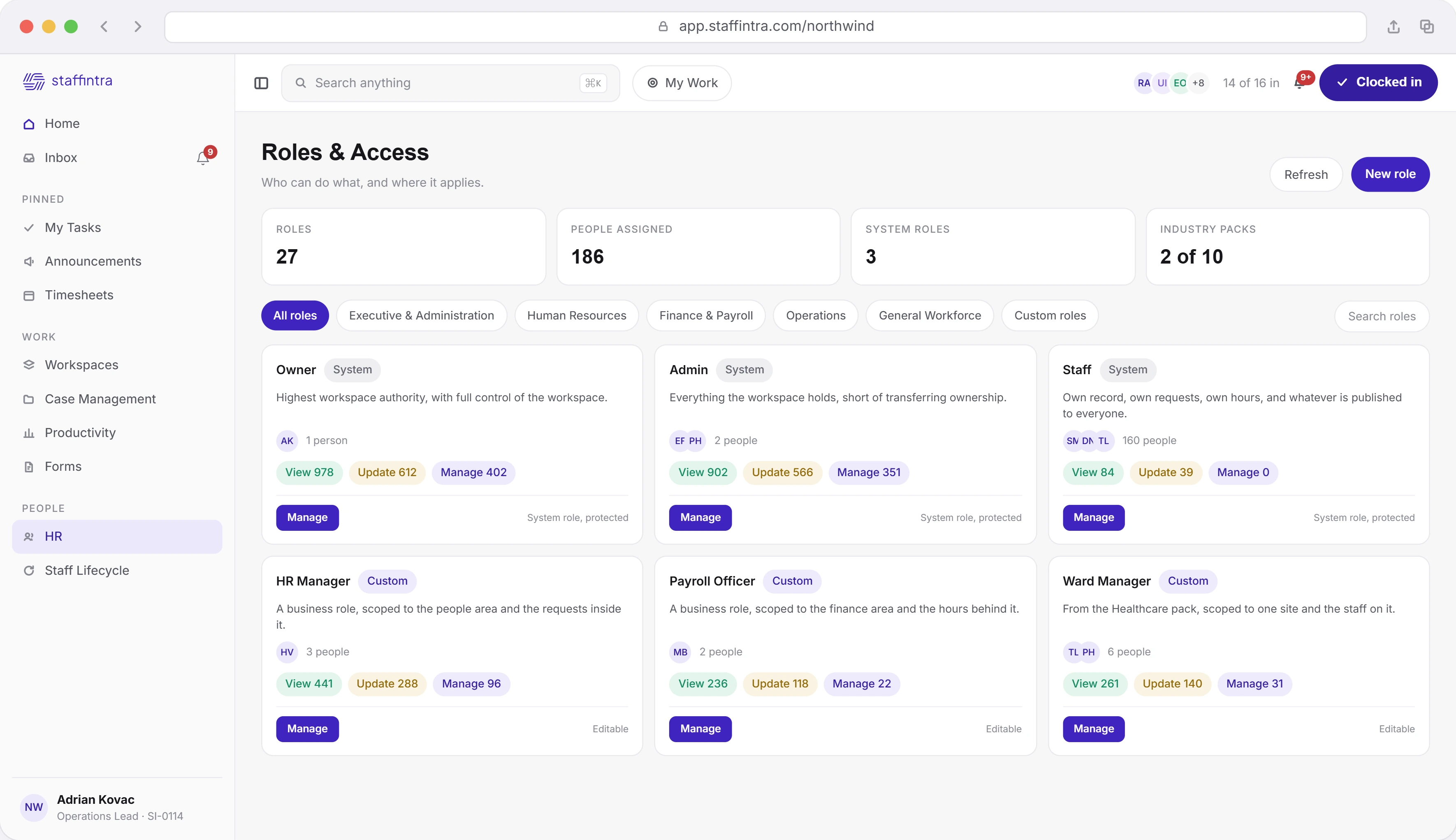
Give each person only the access their role needs.
Owner, Admin and Staff come built in. Add your own roles or install ready-made ones, and limit each permission to a person’s own records, their team, department or site, or the whole company. Sensitive permissions are flagged before you save.
The people a role gets assigned to- SelfTheir own records
- TeamTheir team
- DepartmentTheir department
- LocationTheir site
- OrganizationThe whole workspace
- CustomA filter you define
Owner, Admin and Staff are the system roles a workspace starts with. All three are marked protected and none can be archived. Every other role is one you create, duplicate or install from an industry pack, and those stay editable.
A permission is not simply on or off. It carries a scope, so the same key can mean their own records, their team, their site or the whole workspace. The scope travels with the permission into the query that reads the data.
The editor previews the effective result as you change it: what the role really holds once inheritance is resolved, and which keys count as sensitive. Anything ending in manage or delete, and anything touching billing, payroll, accounting or settings, does. Roles and Access is owner only.
Every request is checked before anything happens.
Almost every action in StaffIntra is tied to a named permission, checked before it runs: 807 rules over 978 permissions, generated from the product itself so a rule can’t drift from what it protects. Refusals are recorded with the reason, and the 45 exceptions are listed by name in one place.
How the workspace fits togetherThe map is built from the routes themselves rather than kept by hand, so a route and its rule cannot drift apart. Reads are the bulk of it at 372 of the 807, writes account for 252 and deletes for 78.
When the answer is no, StaffIntra writes an access denied row carrying the endpoint, the method, the permission key it needed, which layer refused, the reason and the roles held at the time. A denial you can read afterward beats one that only produced a red toast.
Forty five path prefixes short circuit the check, all named in one file. Some run before a session exists: sign-in, signup, workspace lookup, the payment webhook and the two-factor routes. The rest are module endpoints, attendance and payroll among them, that authorize inside the handler.
More than a password stands between a leaver and the payroll screen.
Two-factor sign-in is checked on every request, not just at the login form, and it’s tied to that exact sign-in session. Clock-in terminals sign everything they send, and connected accounts’ tokens are encrypted.
Where a verified punch ends up- A person signing inSix digit code
- A clock-in terminalSigned request body
- A connected accountEncrypted token
The verification cookie has to name the current sign-in session, so one carried over from a previous session does not pass. Platform level administrators get 48 hours from the day their account is created to finish enrolling, counted down in a banner in the product.
A terminal, or an on-prem bridge relaying for hardware that cannot reach HTTPS itself, posts to an endpoint belonging to that one device and signs every punch with a 32 byte secret issued at registration and returned once. A bad signature is refused. An unmatched punch is logged unmapped rather than attributed to somebody.
Google Workspace connects per employee. Slack, QuickBooks Online and GitHub connect once for the whole workspace. Every stored token is encrypted at rest with AES-256-GCM under a key the application never writes to the database.
Six weeks later, nobody can say who changed it
Every notable action writes a row: what happened, who did it, in which workspace, the details, the IP address and the time. Fifty four action names are defined and the activity feed reads them back as sentences. An action the feed has no wording for still appears as a row rather than disappearing, which is the difference between a log that is incomplete and one that is misleading.
Who can see a case, and who can act on it
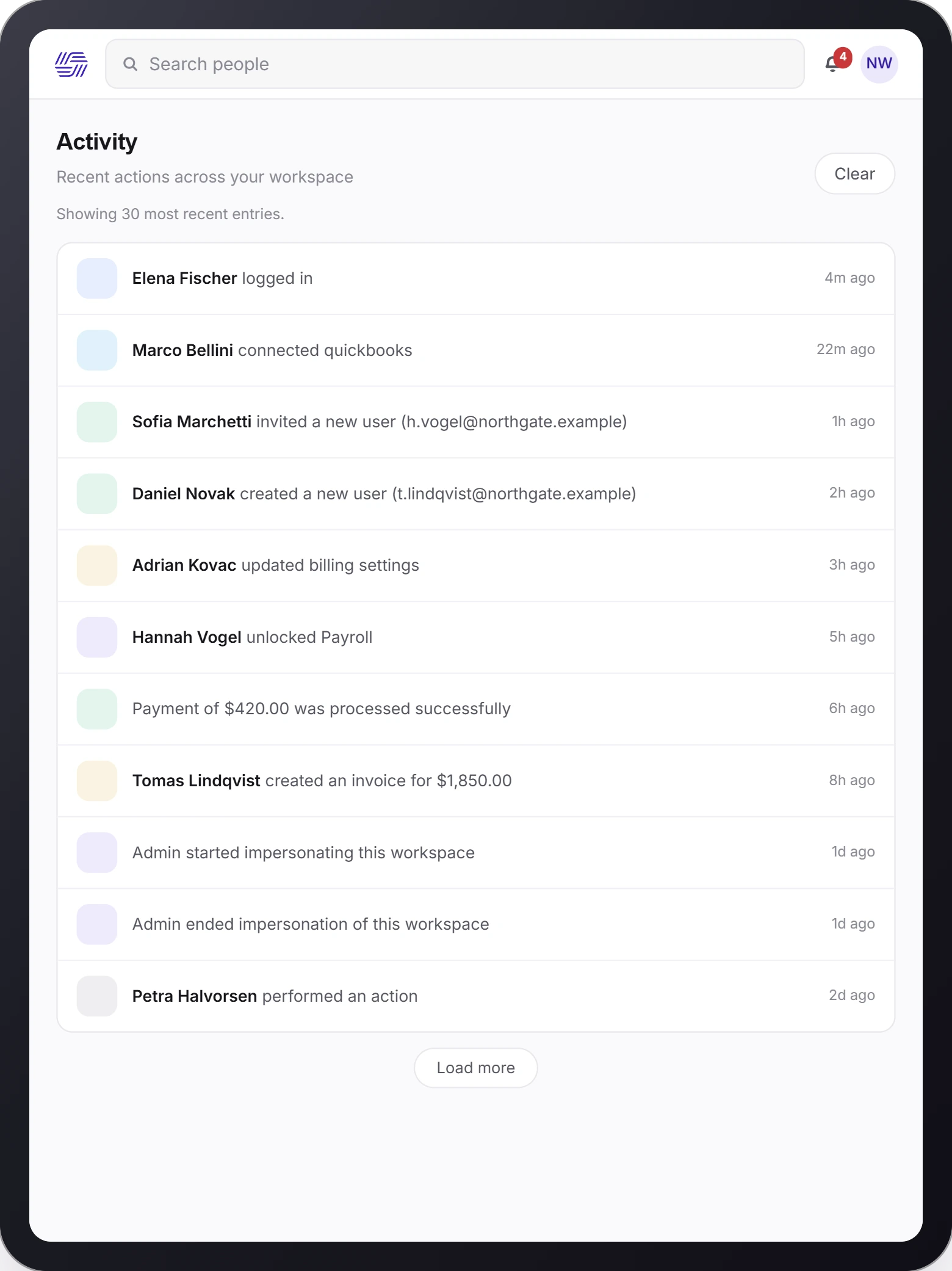
Every read is pinned to your workspace first. A reader who does not hold audit view all, audit manage, settings view or settings manage sees only their own rows, so the same feed means one thing to an owner and something narrower to everybody else.
Thirty rows at a time, so nothing shifts underneath you, and no single request hands back more than a hundred however it is asked.
The clear control writes a marker in that one browser and hides everything older than it. The rows are untouched and the marker lifts again from the same screen. A record you can quietly erase is not a record.
What it is allowed to watch, and what it is not
Activity tracking can show which applications and website domains a person used, and how much of the day was active. What it captures beyond that is a decision you make, and the intrusive parts are off until you turn them on. Full page URLs and window titles both default to off, because either can carry a search term, a document name or an email subject. Some things are never collected at all: keystrokes, passwords, the clipboard, microphone, camera, screenshots or screen recordings, and the contents of messages and documents.
See how hours are recordedWhat the product may collect is configured in one place, and how that activity is scored in another. Deciding to measure something is a different decision from deciding what it means, and one screen encourages one person to make both at once.
A score is proposed by the system, then confirmed, changed or rejected by a manager who records why when they disagree. Nothing lands on a person's record because software decided it and nobody looked.
Activity nobody has categorized yet is reported as a data-quality gap, not counted against the person. A tool that reads "we have not looked at this yet" as "unproductive" punishes its own configuration backlog.
AI with clear boundaries
Every workspace connects its own AI provider, under the contract and the data terms you have already signed. Provider credentials belong to the workspace and are never stored at platform level, so there is no shared pool of customer keys here to leak. With no provider configured there are no AI calls at all, and the rest of the workspace is unaffected.
What your company AI answers from- The modelYour provider, your account
- The keyHeld by the workspace, never platform-wide
- No providerNo calls, and nothing else changes
OpenAI, Anthropic, Gemini or any OpenAI-compatible endpoint you already run, including one you host yourself. Not a model choice somebody else negotiated on your behalf.
Credentials sit with the tenant, never platform-wide. Usage is visible per workspace, and the per-call log names the provider, the model and the outcome.
If your security review ends with "no AI for now", that is a supported configuration rather than a workaround. Disable a provider and the assistant stops using it.
Know what leaves the building
"Answers from your workspace, not the open internet" describes where the content of an answer comes from: your own policies, documents and records, never a crawl of the public web. It is not a claim that nothing is sent anywhere. If you connect a hosted provider, that provider composes the answer, under the agreement you hold with them. If that is not acceptable, connect an endpoint you run yourself, or connect none at all.
Have a security question?
Bring the review with you. Everything on this page was counted from the product.